



For years I’ve been curious with hosting my own stuff. The idea of having total control and understanding of the whole web path was something I was always interested in.
The weak point was always the same: deployment.
Every tiny change meant:
- Run the build
- Delete the old folder on the server (using FTP or the file explorer)
- Upload the new
distfolder - Double-check that I didn’t break anything
It worked… but it was manual, boring, and very easy to overlook. This year I finally fixed that.
Now, when I push a commit or hit Publish in WordPress, a little chain of events wakes up somewhere between GitHub and my home server, and a few seconds later the production site is already updated.
No Delete and Copy, no FTP. Just a git push, the same way you would do it on Vercel, Heroku, Netlify or GitHub Pages.
What “automatic deployment” means here
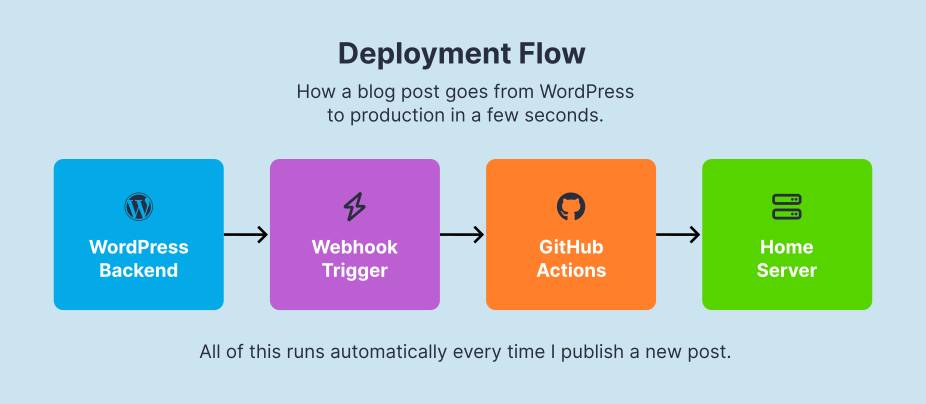
Let’s start with this blog, nico.ar. The flow for a new post looks like this:
- I write the post in WordPress, using that installation purely as a backend.
- When I hit Publish, WordPress sends a webhook (a simple HTTP request) to GitHub.
- GitHub Actions receives that webhook and triggers a build workflow for my Astro repo.
- The workflow runs
npm run buildon GitHub’s servers, generating thedist/folder. - When the build finishes, GitHub connects over SSH to my home server and syncs the new
dist/to the real directory that Apache is serving. - A few seconds later, the new post is already live on nico.ar.
From my point of view, the only visible action is step 1: writing and publishing. Everything else happens behind the scenes.
For Blur FM and other static websites, the idea is the same but the trigger is different:
- In those projects I don’t have the WordPress API in the middle.
- The deployment starts whenever I push new commits to the
mainbranch in GitHub. - That push triggers the same kind of build + upload workflow to my home server.
Same pattern, different trigger. I can work on new features and trigger a deploy whenever I push to something to the main branch.
A webhook in plain words
A webhook is just a URL that says: “when X happens, call this URL and tell it what changed.”
In my case:
- In WordPress:
“When a post is published or updated → call GitHub with this payload → trigger a new build for the site.” - In GitHub:
“When you receive this payload → run the Astro build workflow → deploy the new build to the server.”
You don’t need a big platform or an expensive service to make this work. It is literally just HTTP requests, a bit of custom JSON, and some light server tinkering.
The pieces of the puzzle
I’ll keep the stack simple and honest, because that’s how it actually runs at home:
- WordPress
I write on a separate WordPress instance. It’s just my editor and content manager, not exposed to the public. - Astro
The public sites (nico.ar, Blur FM and Lo del Nico) are built with Astro as static sites. - GitHub
All the Astro code lives in GitHub repos. GitHub Actions takes care of building the sites. - Home server + Apache
A small machine at home serves the final, static files with Apache. It only knows one thing: “whatever is in this folder is the live site”.

The magic is how these four pieces talk to each other without me having to babysit them.
But why not Netlify or Vercel?
Services like Netlify or Vercel are great, especially if you do not want to mess with hosting and servers. They get the job done in a few simple steps and you never have to think about what is running where.
In my particular case:
- I already have a desktop PC running 24/7 for other projects (radio streaming since 2009).
- I like to be in control without involving extra monthly bills or another third party.
- It feels very efficient to let GitHub Actions do the builds and have those files served from home.
As long as it can be built with npm run build and the output is a dist folder, the recipe is always the same.
Conclusion
Once everything is set up, the tools almost disappear: I just code or write a blog post like this one, hit Publish, and a few seconds later the new version is online.
Useful links
- Astro Docs – Deploy your Astro Site
Official guide on how to build and deploy Astro sites to different hosts. - Astro Docs – Develop and build
Explains whatnpm run builddoes and how thedist/folder is generated. - GitHub Docs – GitHub Actions
Main documentation hub for GitHub Actions, workflows and runners. - WordPress Developer Resources – REST API Handbook
Official guide to sending and receiving JSON from WordPress, useful if you want to roll your own webhooks or integrations.


